
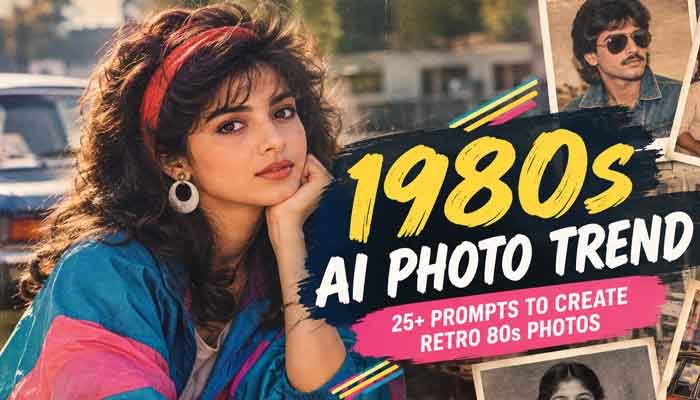
The 1980s AI photo trend has quickly become one of the most popular ways to turn modern photos into nostalgic retro portraits.
The 1980s are back, and this time you don’t need an old photo album to experience them.
A new 1980s AI photo trend is taking over social media, with people turning ordinary selfies and portraits into images that look like they were taken decades ago. Big hairstyles, colourful outfits, vintage cars, old family-photo settings and that slightly imperfect film look are all part of the appeal.
What makes this trend different from a normal vintage filter is that AI can change much more than the colour of a photograph. You can recreate the clothes, hairstyle, background, lighting, camera feel and even the type of photograph you want.
Want to see yourself as an 80s college student? You can.
Want an old-school family album photo? You can create that too.
Or maybe you want a classic Bollywood-inspired portrait, a retro wedding picture or a casual street photograph from the 1980s.
The right prompt can make a surprisingly big difference.
In this guide, you’ll find 25+ 1980s AI photo prompts, along with tips for getting a more natural and believable result
Read Also This : Best ChatGPT Alternatives for Beginners in 2026: Top AI Tools Like ChatGPT
What Is the 1980s AI Photo Trend?
The 1980s AI photo trend is a social media trend where people use AI image tools to transform modern photographs into images inspired by the visual style of the 1980s.
The 1980s AI photo trend recreates the colors, clothing, lighting, film grain, and composition associated with vintage 80s photography.
Instead of simply putting a faded filter over a selfie, AI can recreate several parts of the photograph at once.
For example, you can ask AI to:
- Change your modern clothes into 1980s fashion
- Give your hair a period-appropriate style
- Replace a modern background with an old-school setting
- Add the look of analogue film
- Create softer lighting and natural shadows
- Add subtle film grain
- Make colours look slightly faded
- Recreate an old family-album photograph
- Give the image a classic cinema or studio-portrait feel
The trend has recently spread across Instagram and X, with celebrities and everyday users experimenting with different versions of the retro look.
And because AI image generators have become much better at handling faces and detailed instructions, the results can look considerably more convincing than the old-school filters people used a few years ago.
Why Is the 1980s AI Photo Trend So Popular?
Part of the attraction is nostalgia.
The 1980s had a very recognizable visual identity. Photographs from the period often had softer detail, visible film grain, flash photography, strong colours and the occasional imperfection caused by analogue cameras and printed photographs.
There is also something fun about seeing yourself in a completely different era.
A normal selfie can suddenly become:
- An 80s school portrait
- A family-album snapshot
- A Bollywood-style movie still
- A vintage wedding photograph
- A retro college picture
- A disco portrait
- A classic studio photograph
- A casual street photo
That combination of nostalgia and personalization is what makes the trend particularly shareable.
25+ Best 1980s AI Photo Prompts
The prompts below are designed to give AI enough information to understand the era without making the final image look like a generic “retro filter.”
You can copy them and adjust the details to match your photo.
These 1980s AI photo trend prompts can help you create everything from family-album photos to Bollywood-inspired portraits.
1. Classic 1980s Portrait Prompt
Transform my uploaded photo into a realistic 1980s portrait. Keep my facial identity, facial structure, skin tone and natural expression recognizable. Give me authentic 1980s hair and clothing, with soft studio lighting, subtle 35mm film grain, slightly faded colours and the natural texture of an old printed photograph. Make it look like a real photograph from the decade, not a modern photo with a vintage filter.
2. 1980s Family Album Photo
Turn my uploaded photo into a genuine-looking 1980s family album photograph. Keep my face and identity unchanged. Add period-appropriate clothing, a modest family living room, wooden furniture, patterned curtains and a vintage television in the background. Use soft indoor lighting, slight film grain, mild colour fading and small imperfections typical of an old printed photograph.
3. 1980s Bollywood-Inspired Portrait
Recreate my uploaded photo as a dramatic 1980s Indian cinema portrait. Preserve my recognizable face and natural features. Add authentic 1980s Indian fashion, classic hairstyle, warm studio lighting and a cinematic background inspired by old Indian movie photography. Use analogue film grain, slightly faded colours and realistic photographic imperfections.
4. 1980s College Student
Transform my photo into a realistic 1980s college portrait. Keep my face recognizable and natural. Dress me in authentic 1980s student fashion and place me on an old college campus with period-appropriate architecture, books and simple accessories. Use natural daylight, 35mm film texture and slightly faded colours.
5. 1980s Wedding Photo
Turn my uploaded photo into a realistic 1980s wedding photograph. Preserve my face and identity. Add period-appropriate wedding clothing, hairstyle, jewellery and a traditional decorated wedding setting. Use direct camera flash, soft film grain, slightly warm colours and the imperfect texture of an old printed wedding photograph.
6. 1980s Street Style
Recreate my photo as an authentic 1980s street-style photograph. Keep my face recognizable. Give me classic 80s clothing, hairstyle and accessories, with an old city street, vintage vehicles and period-appropriate signs in the background. Use natural daylight, analogue film grain and slightly faded colours.
7. 1980s Disco Look
Transform my uploaded portrait into an energetic 1980s disco photograph. Keep my facial identity unchanged. Add authentic 80s fashion, hairstyle and accessories, with colourful disco lighting, a dance floor and subtle film grain. Make the photograph look like it was captured on an analogue camera in the 1980s.
8. 1980s Studio Headshot
Create a realistic professional studio portrait from the 1980s using my uploaded photo. Preserve my face, facial structure and skin tone. Use a simple studio background, soft directional lighting, period-appropriate hairstyle and clothing, subtle 35mm grain and slightly muted printed-photo colours.
9. 1980s Couple Photo
Transform our uploaded photo into a realistic 1980s couple photograph. Preserve both faces and identities. Give us authentic 1980s hairstyles, clothing and accessories and place us in a period-appropriate outdoor setting. Use soft analogue film texture, natural lighting and slightly faded colours.
10. 1980s Best Friends Photo
Turn our photo into an authentic 1980s best-friends snapshot. Keep everyone’s face recognizable. Add period clothing, hairstyles and accessories, with a casual outdoor setting and natural poses. Make it look like a real photograph from an old family album rather than a digitally edited image.
11. 1980s Pakistani Family Portrait
Transform my uploaded photo into a realistic Pakistani family portrait from the 1980s. Preserve everyone’s facial identity and natural expressions. Use authentic 1980s Pakistani clothing, a traditional home interior, period-appropriate furniture and a vintage family-photo atmosphere. Add subtle analogue film grain, soft flash lighting and slightly faded printed colours.
12. 1980s South Asian Wedding
Recreate my uploaded photo as a realistic South Asian wedding photograph from the 1980s. Keep the faces and identities recognizable. Use authentic traditional clothing, hairstyles, jewellery, wedding decorations and an old-style studio photography setup. Add direct flash, soft film grain and the slightly imperfect look of a printed photograph.
13. 1980s Childhood Memory
Make my uploaded photo look like a genuine childhood photograph taken in the 1980s. Preserve my recognizable facial features while making the clothing, background and styling period-appropriate. Use a simple home or neighbourhood setting, natural expressions, analogue film grain and slightly faded colours.
14. 1980s Old School Photo
Turn my photo into a realistic 1980s school portrait. Keep my face and identity recognizable. Add a simple school uniform, old classroom or studio background, soft flash photography and authentic analogue film grain. Avoid modern objects, digital screens and contemporary clothing.
15. 1980s Musician Portrait
Transform my photo into an authentic 1980s musician portrait. Preserve my face and natural facial structure. Give me period-appropriate clothing, hairstyle and accessories, with a vintage microphone, studio or backstage setting. Use dramatic but realistic analogue lighting, 35mm film grain and slightly faded colours.
16. 1980s Retro Car Photo
Recreate my uploaded photo as a realistic 1980s street photograph with me standing beside a classic car from that era. Keep my face recognizable. Add authentic 1980s clothing, hairstyle and accessories. Use natural evening light, subtle film grain and realistic vintage photography.
17. 1980s Vacation Photograph
Turn my uploaded photo into a believable vacation photograph from the 1980s. Preserve my face and identity. Add period-appropriate clothes, sunglasses and accessories and place me in a realistic holiday setting. Use analogue film grain, direct flash and slightly faded colours like an old printed travel photograph.
18. 1980s Office Portrait
Transform my photo into a realistic 1980s office portrait. Keep my face and identity unchanged. Add period-appropriate professional clothing, an old office desk, paperwork, a desk telephone and vintage office equipment. Use soft indoor lighting and natural 35mm film grain.
19. 1980s Passport-Style Portrait
Recreate my uploaded photo as a realistic 1980s identification-style portrait. Preserve my exact recognizable facial features and natural expression. Use a simple neutral background, period-appropriate clothing, slightly uneven studio lighting and subtle analogue film texture.
20. 1980s Newspaper Photo
Transform my photo into a realistic black-and-white newspaper photograph from the 1980s. Preserve my facial identity and natural expression. Use authentic documentary-style composition, slightly coarse film grain, imperfect contrast and the texture of an old printed newspaper photograph.
21. 1980s Cinema Poster
Turn my uploaded portrait into a fictional 1980s movie-poster photograph. Keep my face recognizable while adding authentic 1980s fashion, dramatic studio lighting and cinematic composition. Use analogue film grain, slightly faded colours and the printed texture of an old movie poster.
22. 1980s Rainy Street
Recreate my photo as a cinematic 1980s rainy street photograph. Preserve my face and identity. Add period-appropriate clothing, vintage cars, old shop signs and warm street lighting. Use realistic reflections, subtle 35mm film grain and slightly imperfect analogue photography.
23. 1980s Summer Photo
Transform my uploaded photo into a casual summer photograph from the 1980s. Keep my face recognizable. Add authentic summer clothing, natural outdoor lighting and a simple period-appropriate background. Use slightly faded colours, soft focus and realistic analogue film grain.
24. 1980s Bedroom Snapshot
Turn my photo into a candid 1980s bedroom snapshot. Preserve my face and identity. Add period-appropriate clothing, furniture, posters, cassette tapes and a vintage television or music system. Use direct camera flash, realistic shadows, film grain and slightly faded colours.
25. 1980s Black-and-White Portrait
Transform my uploaded photo into a classic black-and-white 1980s portrait. Keep my facial identity, facial structure and natural expression unchanged. Use soft studio lighting, realistic shadows, fine analogue film grain and the subtle imperfections of traditional photographic printing.
26. 1980s Retro Fashion Magazine
Recreate my uploaded photo as a fictional 1980s fashion magazine portrait. Preserve my recognizable face. Add authentic 80s clothing, hairstyle and accessories, studio lighting and a simple editorial background. Use realistic analogue film texture and avoid modern digital photography.
27. Old Photograph With Natural Imperfections
Make my uploaded photo look like a genuine photograph that has been sitting inside an old family album since the 1980s. Keep my face recognizable and natural. Add authentic period clothing and surroundings, mild film grain, slight colour fading, tiny exposure imperfections and realistic printed-paper texture. Do not make it look artificially damaged or heavily filtered.
How to Get Better Results From 1980s AI Photo Prompts
A common mistake is using a very short prompt such as:
“Make my photo look 80s.”
It may work, but the result can look generic.
A better prompt tells the AI exactly what should change and what should stay the same.
1. Tell AI to preserve your identity
If you’re transforming a personal photo, mention:
- Keep my face recognizable
- Preserve my facial structure
- Keep my skin tone natural
- Maintain my natural expression
- Do not change my identity
This helps reduce unnecessary changes to facial features.
2. Describe the setting
The background is just as important as the clothes.
Instead of saying “retro background,” specify something such as:
- 1980s living room
- Old college campus
- Traditional family home
- Vintage cinema
- Street market
- Wedding hall
- Recording studio
- Disco
- Old office
The more specific the setting, the easier it is to create a coherent image.
3. Don’t forget the camera look
The vintage feeling doesn’t come only from old clothes.
Try mentioning:
- 35mm film
- Analogue photography
- Subtle film grain
- Soft focus
- Direct flash
- Slightly faded colours
- Natural shadows
- Printed photograph texture
These details can make the final image feel more photographic.
4. Tell AI what NOT to add
This is especially useful when creating an old photograph.
You can add:
Avoid smartphones, modern cars, LED lighting, digital screens, contemporary logos, modern clothing and overly smooth AI skin.
This helps prevent modern elements from appearing in the image.
How to Create a 1980s AI Photo With ChatGPT
Creating the trend is fairly straightforward.
Step 1: Choose a good photo
Start with a clear photo where your face is visible.
A front-facing or three-quarter portrait usually gives an image model enough information to understand your facial features.
Step 2: Upload the photo
Open your AI image tool and upload the photograph you want to transform.
Step 3: Add your 1980s prompt
Paste one of the prompts above and describe the exact look you want.
You don’t have to use the prompt word-for-word.
For example, you can change:
“1980s family album”
to:
“1980s Pakistani family album from the late 1980s.”
Small details like this can make the result more personal.
Step 4: Review the first result
Don’t worry if the first image isn’t perfect.
AI image generation often works better as an editing process.
You can ask for changes such as:
Keep the same face, but make the hairstyle more authentically 1980s.
Or:
Keep the image composition the same, but remove the modern objects from the background.
Step 5: Generate the final version
Once you’re happy with the clothing, background and overall style, create the final image.
The trend is also being used for Instagram posts, profile pictures, personal keepsakes and themed content.
How to Create 1980s AI Photos With Pixelbin
If you prefer using a dedicated image tool rather than writing prompts from scratch, Pixelbin also has a 1980s AI photo trend generator.
The basic process is simple:
- Upload your photo.
- Choose an 1980s-inspired style.
- Add or adjust your prompt.
- Generate the image.
- Review the result.
- Make further edits if necessary.
- Save the final image.
Pixelbin’s current tool is specifically designed around the 1980s trend and supports different retro use cases, including social posts, profile pictures and personal keepsakes.
Tips for Making an AI 80s Photo Look Real
If you want your image to look like a photograph from the actual decade rather than an AI image pretending to be old, focus on small details.
Don’t overdo the grain.
Real photographs don’t normally have giant amounts of artificial noise covering every part of the image.
Use realistic lighting.
Direct flash, soft indoor light and natural daylight can work better than dramatic modern lighting.
Keep the colours slightly imperfect.
A little fading usually looks more convincing than extreme sepia.
Use period-correct objects.
A cassette player, old television, vintage telephone or classic car can instantly establish the decade.
Avoid modern details.
One smartphone or modern LED light in the background can destroy the illusion.
Don’t make the skin too perfect.
Modern AI portraits often look overly polished. Natural skin texture and small imperfections can make the image feel more photographic.
1980s AI Photo Trend: Common Mistakes to Avoid
Using only the word “vintage”
“Vintage” can mean almost anything.
If you want an 80s look, specifically mention 1980s, clothing, setting, lighting and film style.
Changing too many things at once
If you ask AI to completely change your face, body, clothes, location and pose, the final result may stop looking like you.
Start with the identity and composition, then change the styling.
Making the image too perfect
A perfectly sharp, glossy image doesn’t always look like an old photograph.
A little softness, film grain and colour variation can help.
Forgetting regional details
The 1980s didn’t look exactly the same everywhere.
An American 1980s photo, a Pakistani family photo and an Indian cinema-inspired photograph can have very different clothing, architecture and visual details.
Adding the location or cultural context to your prompt can produce a much more convincing result.
Is the 1980s AI Photo Trend Free?
That depends on the AI image tool you’re using.
Some platforms offer free generations or limited credits, while others require a subscription or paid credits for higher-quality generations.
Before uploading personal photographs, it’s also worth checking the platform’s privacy and image-handling policies.
Is It Safe to Upload Your Photo to an AI Tool?
It’s worth being a little careful.
A personal photograph contains more information than just your appearance. Depending on the service, uploaded images may be stored or processed according to its terms and privacy policy.
For casual trend images, avoid uploading photographs containing unnecessary private information, documents, addresses or other sensitive details.
If you’re uploading somebody else’s photograph, make sure you have permission to use it.
Final Thoughts
The 1980s AI photo trend is more than another social media filter. It combines nostalgia with modern image generation, allowing almost anyone to imagine what they might have looked like in another decade.
The biggest difference between an average result and a convincing one is usually the prompt.
Don’t just ask AI to make a photo “retro.” Tell it about the clothes, hairstyle, location, lighting, camera style and photographic texture you want.
And most importantly, keep the details believable.
A little film grain, slightly faded colour and an imperfect flash can often do more for an authentic 80s look than a heavy vintage effect.
So, whether you want an old family-album picture, a retro college portrait, a Bollywood-inspired look or simply a fun throwback photo, try one of the prompts above and give your modern picture an entirely different decade.
Whether you want a family snapshot or a cinematic portrait, the 1980s AI photo trend makes it easy to experiment with vintage AI photography.
1980s AI Photo Trend FAQs
What is the 1980s AI photo trend?
The 1980s AI photo trend involves using AI image tools to transform modern photographs into images inspired by 1980s fashion, photography, hairstyles, locations and analogue film.
What is the best prompt for an 80s AI photo?
A strong prompt should mention the 1980s, clothing, hairstyle, location, lighting and analogue photography style. It should also tell the AI to preserve your facial identity if you’re transforming your own photo.
Can I make an 80s photo with ChatGPT?
Yes. You can upload a suitable photograph and describe the 1980s look you want. You can also refine the generated image with follow-up instructions.
How do I make my AI photo look genuinely old?
Use realistic period details, subtle film grain, slightly faded colours, soft focus and appropriate lighting. Avoid excessive grain or artificial damage.
Can I create an 80s Bollywood-style photo?
Yes. You can ask for an Indian cinema-inspired 1980s look with period clothing, hairstyles, dramatic studio lighting and an analogue film aesthetic.
Can I create a Pakistani 1980s photo?
Yes. Add specific Pakistani cultural details such as traditional clothing, home interiors, wedding settings or period-appropriate street environments to make the result more authentic.
Why does my 1980s AI photo still look modern?
The prompt may not contain enough period-specific details. Try adding the type of camera look, clothing, hairstyle, background, lighting and objects that would realistically belong to the 1980s.
Can I use these prompts with other AI image generators?
Most of these prompts can be adapted for different AI image-generation tools. However, the exact result will depend on the model and its ability to follow image-editing instructions.