
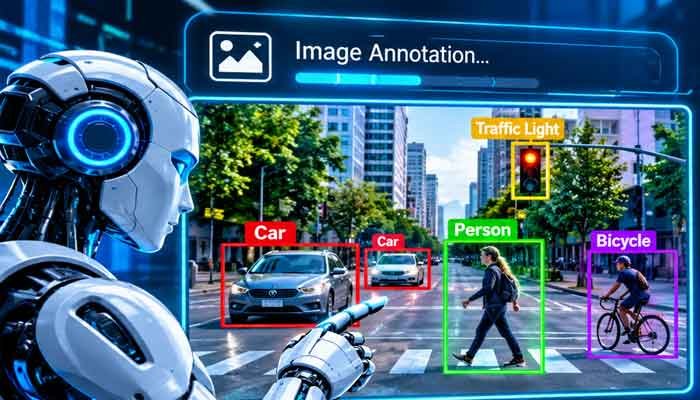
Artificial intelligence is getting better at understanding the visual world, but there is an important process working behind many of these intelligent systems: image annotation. From recognizing vehicles on busy roads to identifying objects in medical scans, AI models need properly labeled visual data before they can perform many computer vision tasks reliably.
Traditionally, preparing this data required people to manually open images, identify objects, draw boxes around them, and assign the correct labels. This approach works, but it becomes slow and expensive when a project involves thousands or even millions of images.
That is where Automatic Image Annotation comes in.
By combining machine learning, computer vision, and modern AI models, automatic annotation systems can identify objects, generate labels, and create image segmentation masks with much less manual effort. Newer developments are also making it possible to describe an object in ordinary language and let an AI model locate it inside an image.
In 2026, this technology is becoming an increasingly important part of computer vision workflows, helping developers, researchers, and businesses prepare training datasets more efficiently.
Read Also This : What Is Muse AI? Complete Guide to Meta’s New AI Assistant (2026)
What Is Automatic Image Annotation?
Automatic Image Annotation is the process of using artificial intelligence and computer vision algorithms to automatically identify objects, recognize visual features, and assign relevant labels to digital images.
Instead of asking a person to manually mark every object, an AI-powered system analyzes the image and generates annotations based on what it detects.
For example, imagine uploading a photograph of a busy street. An automatic annotation system might recognize:
- Cars and motorcycles
- Pedestrians
- Traffic lights
- Road signs
- Bicycles
- Buildings
Depending on the annotation task, the software can also draw bounding boxes around objects, create detailed segmentation masks, or assign categories to the entire image.
These annotations provide structured information that machine learning models can use during training.
The important point is that automatic annotation does not simply add descriptions to photographs. It converts visual information into organized training data that computers can learn from.
How Does Automatic Image Annotation Work?
The technology combines several processes to understand what appears in an image and determine where individual objects are located.
Although different platforms use different models, most automated annotation workflows follow a similar process.
1. Image Upload and Processing
The first step involves uploading images into an annotation platform or connecting a dataset to an AI-powered labeling system.
The software prepares the images for analysis. This may include resizing, normalization, and other preprocessing operations.
For large projects, images are often processed in batches to make the workflow more manageable.
2. Object Detection
The AI model examines the image and identifies objects that match the categories it has been trained or prompted to recognize.
For example, a model designed for retail inventory might detect products on shelves, while a traffic monitoring system could identify vehicles and pedestrians.
Object detection models can estimate the location of each recognized object.
3. Automatic Label Generation
After detecting an object, the system assigns an appropriate label.
For instance, if an image contains three cars and two pedestrians, the software can generate separate labels for each detected object.
More advanced systems can also identify individual instances of the same category.
4. Bounding Boxes and Segmentation Masks
Depending on the project, the system creates different types of annotations.
A bounding box marks an object’s approximate location using a rectangular outline. A segmentation mask goes further by identifying the object’s visible pixels.
Segmentation is particularly useful when the exact shape of an object matters.
5. Human Review and Correction
Even advanced AI systems can make mistakes. They may overlook small objects, confuse similar categories, or produce inaccurate boundaries.
For this reason, professional workflows usually include human verification.
Reviewers examine the generated annotations, correct errors, and approve the final dataset before it is used for model training.
Different Types of Automatic Image Annotation
Not every computer vision project requires the same type of labeling. The annotation method depends on what the AI model is expected to recognize or understand.
Image Classification
Image classification assigns one or more labels to an entire image.
For example, a photograph of a dog may receive the label “Dog,” while a landscape photograph might be classified as “Mountain” or “Nature.”
This approach is useful when identifying the overall subject of an image is more important than locating individual objects.
Object Detection
Object detection identifies objects and marks their locations using bounding boxes.
A single photograph can contain multiple objects, each with its own label and coordinates.
It is widely used in autonomous driving, security systems, retail analytics, and industrial inspection.
Image Segmentation
Image segmentation divides an image into meaningful regions.
Unlike basic object detection, which identifies objects using rectangular boxes, segmentation can outline their actual shapes.
There are different approaches, including semantic segmentation and instance segmentation. Semantic segmentation assigns categories to pixels, while instance segmentation distinguishes individual objects belonging to the same category.
Keypoint Annotation
Keypoint annotation identifies important points on an object or human body.
For example, a human pose estimation system may identify shoulders, elbows, knees, and other body joints.
This method is useful in sports analytics, fitness applications, robotics, and movement analysis.
Image Tagging
Image tagging automatically assigns descriptive keywords to an image.
A photograph might receive tags such as “outdoor,” “car,” “road,” and “sunlight.”
These labels can help organize large image collections and improve image search systems.
Latest AI Developments Making Image Annotation Smarter in 2026
One of the biggest changes in image annotation is the move from traditional manual labeling toward AI-assisted and prompt-based annotation.
Instead of drawing every box or mask from scratch, users can now rely on models that generate initial annotations automatically.
Meta SAM 3 and SAM 3.1
One important development is Meta’s Segment Anything Model 3 (SAM 3), introduced in November 2025.
The model allows users to identify, segment, and track objects in images and videos using short text descriptions, visual examples, or other prompts.
For example, a user can describe an object as a “yellow school bus,” and the model can identify matching objects and generate segmentation masks.
In March 2026, Meta introduced SAM 3.1 with improvements to video processing efficiency. Meta reported that its object multiplexing approach can track up to 16 objects in a single forward pass.
This development is particularly interesting for projects involving crowded scenes, video analytics, and large-scale visual datasets.
It also shows how image annotation is moving beyond simple category labels toward more flexible visual understanding.
Natural Language Image Annotation
Another growing development is natural language image annotation.
Rather than selecting a predefined object category or manually drawing boundaries, users can describe what they want to identify using ordinary language.
For example, a developer might enter:
“Find all red safety helmets in these images.”
An AI model can use that description to locate matching objects and generate annotations.
This approach makes annotation more flexible because users are not always restricted to a fixed list of categories.
Platforms such as Roboflow are incorporating SAM 3-powered workflows that allow users to generate segmentation masks from text prompts and review the results before training a model.
AI-Assisted Annotation Platforms
Annotation platforms are also becoming more intelligent.
Tools such as CVAT and Roboflow combine traditional annotation features with AI-assisted detection, segmentation, and tracking.
CVAT, for example, supports automated annotation through models and integrations, including SAM-based tools and other computer vision frameworks.
These features allow teams to generate initial labels automatically and spend more time reviewing difficult examples rather than manually labeling every image.
Best Automatic Image Annotation Tools to Explore in 2026
Choosing an annotation platform depends on the size of your dataset, technical requirements, budget, and the type of computer vision model you want to build.
Here are some platforms worth exploring.
1. Roboflow
Roboflow is a popular platform for building computer vision datasets and developing AI applications.
Its annotation workflow includes tools for object detection, segmentation, and AI-assisted labeling. Its newer Auto Label capabilities also support prompt-based annotation using compatible models.
It can be useful for developers who want to manage datasets, generate annotations, train models, and prepare them for deployment within a connected workflow.
Website: https://roboflow.com/
2. CVAT
CVAT, short for Computer Vision Annotation Tool, is a widely used annotation platform with open-source and hosted options.
It supports image and video annotation, bounding boxes, polygons, masks, keypoints, and other annotation formats.
Its AI-powered tools can help automate object detection, segmentation, and tracking through supported models and integrations.
CVAT is worth considering for research teams and developers who need more control over their annotation environment.
Website: https://www.cvat.ai/
3. Label Studio
Label Studio is a flexible data annotation platform that supports multiple data types, including images, text, audio, and video.
For image-related projects, it can be configured for classification, object detection, and segmentation workflows.
Its machine learning integrations can assist with generating predictions that annotators review and correct.
Website: https://labelstud.io/
4. Labelbox
Labelbox is designed for professional data labeling and AI development workflows.
It offers tools for managing annotation projects, reviewing labeled data, and working with large datasets.
Organizations building more complex AI systems may find its workflow management and quality-control capabilities useful.
Website: https://labelbox.com/
5. Ultralytics Platform
Ultralytics provides computer vision tools and workflows built around its YOLO ecosystem.
Its platform supports dataset management, annotation, model training, and deployment.
It is particularly relevant for developers working on object detection and related computer vision applications.
Website: https://www.ultralytics.com/
Note: Features, model integrations, and pricing can vary by platform, subscription, and deployment method. Check the official documentation before choosing a tool.
Real-World Applications of Automatic Image Annotation
Automatic annotation is not limited to technology companies or AI research laboratories. It has practical applications across several industries.
Healthcare and Medical Imaging
Medical researchers can use annotated images to develop computer vision systems that identify anatomical structures and highlight potentially important regions in medical scans.
For example, segmentation masks can help prepare datasets for research involving organs, tissues, and abnormalities.
However, medical annotations require expert review because incorrect labels can affect the reliability of research and clinical AI systems.
Autonomous Vehicles
Self-driving technology depends on understanding complex road environments.
AI systems need training images showing cars, pedestrians, traffic lights, road markings, bicycles, and other objects.
Automatic Image Annotation can help prepare these datasets and reduce the manual effort involved in labeling large collections of driving footage.
Retail and E-Commerce
Online retailers can use image annotation to organize product catalogs and develop visual search systems.
For example, a computer vision model could learn to identify shoes, clothing, accessories, and other products from photographs.
This can support product categorization, inventory monitoring, and image-based shopping experiences.
Agriculture
Agricultural AI applications can analyze images captured by drones, cameras, and other devices.
Annotated images can help train models to identify crops, weeds, plant diseases, and damaged areas.
Such systems may support more targeted monitoring and agricultural decision-making.
Manufacturing and Quality Control
Factories can use computer vision to identify scratches, cracks, missing components, and other product defects.
Accurately annotated images help train inspection models to distinguish acceptable products from those requiring additional attention.
Security and Surveillance
Video analytics systems can use annotated visual data to recognize people, vehicles, and other objects.
These capabilities can support traffic monitoring and security analysis, subject to appropriate privacy protections and legal requirements.
Benefits of Automatic Image Annotation
The growing adoption of automated annotation is largely connected to the practical problems it can solve.
Reduced manual workload: AI can generate initial labels and masks, reducing the amount of repetitive drawing and labeling required from human annotators.
Faster dataset preparation: Large collections of images can be processed in batches, helping teams prepare training data more efficiently.
Improved scalability: Organizations can build annotation workflows that handle growing datasets without relying entirely on manual work.
Consistent labeling workflows: Defined annotation rules and AI-generated suggestions can help teams maintain more consistent labels across projects.
Support for complex visual tasks: Modern segmentation and tracking models can handle tasks that would otherwise require considerable manual effort.
However, these benefits depend on the quality of the underlying models, the dataset, and the review process.
Challenges and Limitations of Automatic Image Annotation
Despite its advantages, automatic annotation is not a perfect solution.
Incorrect Predictions
An AI model may identify an object incorrectly, especially when the image contains unusual objects, poor lighting, or visually similar categories.
Small and Overlapping Objects
Objects that are very small or partially hidden can be difficult to identify accurately.
For example, a crowded street photograph may contain pedestrians who are partially blocked by vehicles.
Dataset Bias
If the training data does not represent different environments, lighting conditions, object types, and visual backgrounds, the resulting annotations may be less reliable in unfamiliar situations.
High-Quality Human Verification
Automatic systems can generate large quantities of annotations, but quantity does not guarantee quality.
Human reviewers remain important for checking incorrect labels, missing objects, and inaccurate segmentation boundaries.
Data Privacy and Security
Images may contain faces, personal information, private locations, or confidential business material.
Organizations should understand where their images are stored, how they are processed, and whether their chosen platform meets relevant privacy and security requirements.
Automatic Image Annotation vs. Manual Image Annotation
Both approaches have an important role in computer vision projects, but they work differently.
| Feature | Automatic Annotation | Manual Annotation |
|---|---|---|
| Label creation | AI-generated | Human-generated |
| Processing speed | Often faster at scale | Usually slower |
| Human involvement | Mainly review and correction | Required throughout |
| Initial cost | Depends on tools and setup | Depends on labor |
| Accuracy | Depends on model quality | Depends on annotator skill |
| Best use | Large or repetitive datasets | Complex and sensitive tasks |
For many modern projects, a combination of both methods is more practical than relying exclusively on one approach.
How to Build a Reliable Automatic Image Annotation Workflow
If you are planning to use this technology in a real project, a structured workflow can make a significant difference.
- Define your objective: Decide whether your model needs image classification, object detection, segmentation, or another annotation type.
- Collect representative images: Include different environments, lighting conditions, object sizes, and real-world scenarios.
- Choose an annotation platform: Explore tools such as Roboflow, CVAT, or Label Studio based on your project requirements.
- Generate initial annotations: Use an appropriate AI model to detect objects and create labels or segmentation masks.
- Review the results: Correct missing objects, incorrect categories, and inaccurate boundaries.
- Export the dataset: Select a format compatible with your training framework, such as COCO, YOLO, or Pascal VOC.
- Train and evaluate your model: Test it on separate images that were not used during training.
- Improve the dataset: Use model errors to identify areas where additional annotation is needed.
This process helps ensure that automation improves productivity without sacrificing dataset quality.
What Is the Future of Automatic Image Annotation?
The future of image annotation is likely to involve deeper integration between foundation models, computer vision systems, and human review workflows.
Text-based prompts are making it easier to identify objects without relying entirely on predefined categories. Improved segmentation models are also helping users create more detailed annotations from simple instructions.
Another important direction is active learning. Instead of asking humans to review every image equally, an AI system can identify uncertain or difficult examples and prioritize them for human inspection.
Video annotation is also becoming more advanced. Modern models can detect and follow objects across multiple frames, reducing the need to label every frame independently.
At the same time, quality control, dataset diversity, privacy, and domain-specific expertise will remain important.
The goal is not simply to remove humans from the annotation process. It is to let AI handle repetitive work while people focus on decisions that require judgment and experience.
Final Thoughts
Automatic Image Annotation is becoming an important technology in the development of modern artificial intelligence. By automating object detection, image labeling, and segmentation, it helps developers and organizations prepare computer vision datasets more efficiently.
Recent developments such as Meta’s SAM 3 and SAM 3.1, along with prompt-based annotation workflows, demonstrate how quickly this field is evolving.
Still, automation should not be confused with guaranteed accuracy. Human verification, representative training data, and proper quality control remain essential for building dependable AI systems.
For developers, researchers, and businesses working with computer vision, understanding Automatic Image Annotation is no longer just a technical advantage. It is an increasingly useful part of preparing AI systems for real-world applications.
Frequently Asked Questions (FAQs)
What is Automatic Image Annotation in AI?
Automatic Image Annotation is the use of AI and computer vision to identify objects, generate labels, and mark regions within images without requiring every annotation to be created manually.
How does automatic image labeling work?
An AI model analyzes an image, detects relevant objects, and generates labels, bounding boxes, or segmentation masks. A human reviewer can then check and correct the results.
Which tools are best for Automatic Image Annotation?
Roboflow, CVAT, Label Studio, Labelbox, and Ultralytics Platform are among the tools worth exploring. The best choice depends on your project, budget, and annotation requirements.
Is Automatic Image Annotation accurate?
It can be highly useful, but accuracy depends on the AI model, image quality, object complexity, and training data. Human verification is recommended for important projects.
What is the difference between image annotation and image labeling?
Image labeling generally refers to assigning categories or descriptions to images or objects. Image annotation is a broader process that can also include bounding boxes, polygons, keypoints, and pixel-level segmentation masks.
Can beginners use automatic image annotation tools?
Yes. Several platforms provide visual interfaces and AI-assisted features that make basic annotation possible without advanced programming knowledge. More complex workflows may require technical experience.
Is Automatic Image Annotation used for video?
Yes. Modern computer vision systems can identify, segment, and track objects across video frames, making automated annotation useful for video analytics and object-tracking projects.