
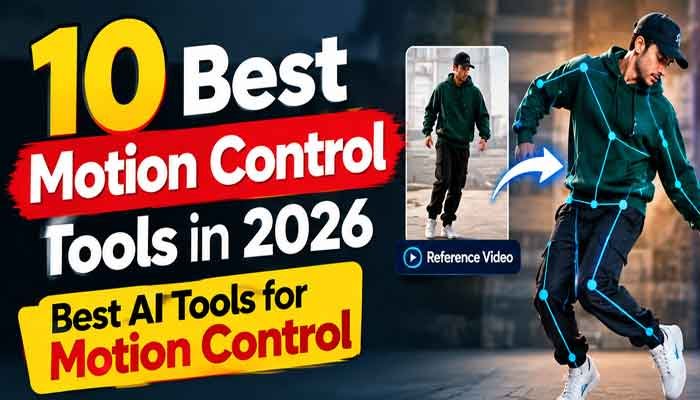
AI video generation has come a long way. A few years ago, creating realistic character movement required animation skills, expensive software, and a lot of editing time. Today, AI motion control tools can turn a simple image into an animated video and give creators much more control over movement.
Whether you want to animate a character, copy a dance movement, create a cinematic camera shot, or produce engaging social media videos, the right motion control tool can make the process much easier.
In this guide, we have selected the 10 best motion control tools in 2026 and explained what each tool is best used for. We will also cover their main features, ideal use cases, and which option may be right for you.
In this guide, we explore the best motion control tools in 2026 for character animation, motion transfer, camera control, and AI video creation.
Read Also This : 5 Best Free AI Video Generators in 2026 – No Subscription
What Is AI Motion Control?
AI motion control is a technology that allows you to control the movement of a character, object, or camera inside an AI-generated video.
Instead of simply writing a prompt and hoping the AI creates the movement you want, motion control lets you provide additional guidance. This can include a reference video, character image, movement pattern, pose, or camera direction.
For example, you can upload a picture of a character and provide a video of someone walking. The AI can use the movement from the reference video to animate the character.
This makes motion control especially useful for character animation, social media content, advertisements, digital storytelling, and AI filmmaking.
10 Best Motion Control Tools in 2026
1. Kling AI
Kling AI is one of the best choices for creators who want detailed control over character movement. Its Motion Control feature allows users to animate a character image using a reference video.
You can use a suitable movement reference to create actions such as walking, dancing, turning, posing, and other human movements. Kling has also improved character consistency and facial movement in its newer video models.
The biggest advantage of Kling is that it combines realistic video generation with motion guidance, making it useful for both beginners and experienced AI creators.
Best for:
- Character animation
- Human motion transfer
- Dance videos
- Walking animations
- AI storytelling
- Social media videos
Best choice for: Overall AI motion control
Official Website : Kling AI
2. Runway Act-Two
Runway Act-Two is designed for performance-driven character animation. Instead of relying only on text prompts, you can provide a performance video and a character.
The AI can transfer elements of the performance to the selected character, including body movements, gestures, facial expressions, and speech.
This makes Runway particularly useful when you want an AI character to behave like a real performer rather than simply move randomly.
Best for:
- Character performances
- Acting scenes
- Talking characters
- Facial expressions
- Hand gestures
- AI filmmaking
Best choice for: Performance capture
Official Website: Runway
3. Viggle
Viggle is another popular AI motion control platform, especially among creators who want to transfer movement from one person or character to another.
The basic idea is simple. You provide a character image and a movement reference, and Viggle uses the reference to animate your character.
It is particularly popular for dance videos, memes, social media content, and entertaining character animations.
Best for:
- Dance videos
- Character animation
- Meme videos
- Social media content
- Motion transfer
- Virtual characters
Best choice for: Easy character motion transfer
Official Website: Viggle
4. Vidu
Vidu is a powerful AI video generation platform that also offers motion-control capabilities.
Its motion workflow allows creators to use a reference video to guide the movement of a character. This can be useful when you want a character to perform a specific action while maintaining the appearance of the original image.
Vidu is also useful for creators who want to combine character references with image-to-video generation.
Best for:
- Character animation
- Motion transfer
- Reference-based video
- AI storytelling
- Social media content
- Creative video projects
Best choice for: Reference-based motion
Visit Now: Vidu
5. Adobe Firefly
Adobe Firefly is a strong option if your main interest is camera movement rather than character motion.
Firefly provides camera controls that can be used to create movements such as zooming, panning, tilting, and other cinematic effects. You can also use a reference video to guide camera movement in supported workflows.
This makes Firefly especially useful for product videos, advertisements, cinematic scenes, and professional creative projects.
Best for:
- Camera movement
- Product videos
- Advertising
- Cinematic shots
- Marketing content
- Professional video projects
Best choice for: AI camera control
Visit Now: Adobe Firefly
6. Luma Dream Machine
Luma Dream Machine is well known for generating cinematic AI videos and adding movement to still images.
Its camera motion controls allow you to experiment with movements such as zooming in, zooming out, orbiting around a subject, moving left or right, and moving vertically.
This can make a static image feel much more dynamic without requiring traditional animation software.
Best for:
- Cinematic videos
- Image-to-video
- Camera movement
- Product visuals
- Landscape shots
- Creative storytelling
Best choice for: Cinematic camera movement
Check It : Luma Dream Machine
7. PixVerse
PixVerse is a user-friendly AI video platform that offers several tools for turning images into videos and experimenting with motion.
Its Motion Control workflow can be used to transfer movement from a reference video to a character image. This makes it a useful option for beginners who want to experiment with AI character animation.
PixVerse is also popular for short-form social media content and creative AI effects.
Best for:
- Short videos
- Character animation
- Motion transfer
- Social media content
- Image-to-video
- AI effects
Best choice for: Beginners and quick experiments
Check It : PixVerse
8. Pika
Pika is focused heavily on creative AI video generation and visual effects. While it is not designed solely around traditional motion capture, it can be useful for creators who want to combine movement with creative transformations.
The platform is particularly suitable for short-form content where visual effects and creativity are more important than precise character performance.
Best for:
- Social media videos
- Creative effects
- Short-form content
- AI animation
- Experimental videos
- Stylized visuals
Best choice for: Creative AI effects
Check It : Pika
9. HeyGen
HeyGen is primarily known for AI avatars and talking characters rather than traditional full-body motion transfer.
However, if your goal is to create a digital presenter, spokesperson, teacher, or talking character, it can be more useful than a conventional motion-control platform.
You can create videos where an AI avatar speaks, moves naturally, and presents information without recording yourself on camera.
Best for:
- Talking avatars
- AI presenters
- Marketing videos
- Educational videos
- Business content
- Social media explainers
Best choice for: Talking AI characters
Check It : Hygen
10. Google Veo
Google Veo is designed for high-quality AI video generation and cinematic content creation.
Rather than focusing exclusively on motion transfer, Veo uses advanced video generation to create realistic scenes from prompts and supported reference-based workflows.
It can be a good option when your priority is overall video quality, realistic movement, storytelling, and cinematic visuals.
Best for:
- Cinematic AI videos
- Storytelling
- Creative filmmaking
- Realistic scenes
- Professional video concepts
- High-quality AI generation
Best choice for: Cinematic AI video generation
Check It : Google Veo
Best Motion Control Tools Compared
If you are still unsure which tool to choose, here is a quick breakdown:
Kling AI: Best overall motion control and character movement.
Runway Act-Two: Best for transferring real performances to characters.
Viggle: Best for simple and entertaining character motion transfer.
Vidu: Best for reference-based character animation.
Adobe Firefly: Best for camera movement and professional creative workflows.
Luma Dream Machine: Best for cinematic camera movement.
PixVerse: Best for beginners and quick AI video experiments.
Pika: Best for creative effects and social media content.
HeyGen: Best for talking AI avatars and presenters.
Google Veo: Best for cinematic AI video generation.
How to Choose the Best Motion Control Tool
The best motion control tool depends on the type of video you want to create.
If you want to make a character dance, walk, or perform an action, Kling AI, Viggle, Vidu, and Runway are good places to start.
If you want to create cinematic camera movements, Adobe Firefly and Luma Dream Machine are more suitable.
For social media content and creative effects, PixVerse and Pika can be useful.
And if you want to create a talking AI presenter, HeyGen may be the better option.
Before choosing a tool, consider its video quality, motion accuracy, generation speed, available credits, pricing, and commercial-use terms.
When choosing the best motion control tools in 2026, consider video quality, motion accuracy, speed, credits, pricing, and commercial-use terms.
Tips for Getting Better AI Motion Control Results
Even the best AI motion control tool can produce poor results if the input is weak. A few simple improvements can make a noticeable difference.
Use a High-Quality Image
Start with a clear image where the character or subject is easy to see. Avoid extremely blurry images or pictures where important parts of the body are hidden.
Choose a Good Motion Reference
If you’re using a reference video, choose footage with clear and continuous movement. Avoid references with too many cuts, camera shakes, or several people moving at the same time.
Match the Character and Reference
Try to use a motion reference that is reasonably similar to your character’s pose and body framing. A full-body character generally works better with a full-body movement reference.
Start With Simple Movements
Don’t begin with complicated choreography. Try walking, turning, waving, or a simple dance movement first.
Once you understand how the tool works, you can experiment with more complicated actions.
Keep Camera Movement Controlled
Fast camera movements can sometimes produce unstable or distorted results. Slow zooms, pans, and gentle camera movements often look more natural.
Generate Short Tests
Before spending all your credits on a long video, create a short test. If the movement looks good, you can then create the final version.
Are Motion Control Tools Free?
Some AI motion control platforms offer free credits, free trials, or limited free generations. However, free access varies between platforms and can change over time.
A tool may allow you to create a few videos for free but require credits for longer videos, higher resolutions, faster generation, or advanced models.
For this reason, always check the current pricing and credit limits before starting a large project.
If your goal is to find free motion control AI tools, it is worth testing the free options available from platforms such as Kling, Vidu, PixVerse, and others before deciding which paid plan, if any, you actually need.
Final Verdict
AI motion control has made character animation and video creation much easier than it used to be.
Among the options available in 2026, Kling AI is one of the best overall choices for character motion control, especially if you want to transfer movement from a reference video to an AI-generated character.
Runway Act-Two is a strong choice for performance capture, while Viggle is excellent for straightforward character motion transfer. Vidu is useful for reference-based animation, and Adobe Firefly and Luma Dream Machine are better suited to camera movement.
There is no single tool that is perfect for everyone. The best option depends on whether you want character animation, camera control, cinematic video, social media content, or talking avatars.
The smartest approach is to test a few tools using the same image and motion reference. Once you find the platform that gives you the right combination of quality, control, speed, and cost, you can build your entire AI video workflow around it.
Frequently Asked Questions
What is the best motion control tool in 2026?
Kling AI is one of the best overall choices for AI character motion control in 2026. It is particularly useful for transferring human movement to character images.
What is the best free motion control AI tool?
There is no single permanently free option because free credits and usage limits change. Kling, Vidu, and PixVerse are worth checking if you want to experiment with motion control without immediately paying.
Which AI tool is best for motion transfer?
Kling, Viggle, Runway Act-Two, and Vidu are among the strongest options for AI motion transfer. Your choice should depend on whether you need simple character movement or full performance capture.
Can AI motion control animate a photo?
Yes. Several AI platforms can turn a still character image into a moving video by using a motion reference or camera movement.
Which tool is best for AI camera movement?
Adobe Firefly and Luma Dream Machine are strong choices for camera-focused AI motion. Both provide tools designed to create controlled camera movements.
Is AI motion control difficult to use?
Most modern AI motion control platforms are designed to be relatively easy to use. Usually, you need a suitable image, a motion reference when supported, and a simple prompt or motion setting.
Can I use AI motion control videos commercially?
Commercial usage depends on the specific platform, model, subscription plan, and content you create. Always check the current terms of service and commercial-use rules before using generated videos for business or monetized content.
Conclusion
The best motion control tools are changing the way creators approach AI video production. Instead of relying completely on random AI-generated movement, you can now guide characters and cameras with much greater precision.
Whether you’re creating TikTok videos, YouTube Shorts, advertisements, animated characters, product videos, or cinematic scenes, there is an AI motion control tool that can fit your workflow.
Start with a simple image and movement reference, experiment with short clips, and gradually increase the complexity of your projects. With the right tool and a little practice, AI motion control can turn ordinary images into engaging and professional-looking videos.
Choosing the best motion control tools in 2026 depends on the type of AI videos you want to create.