
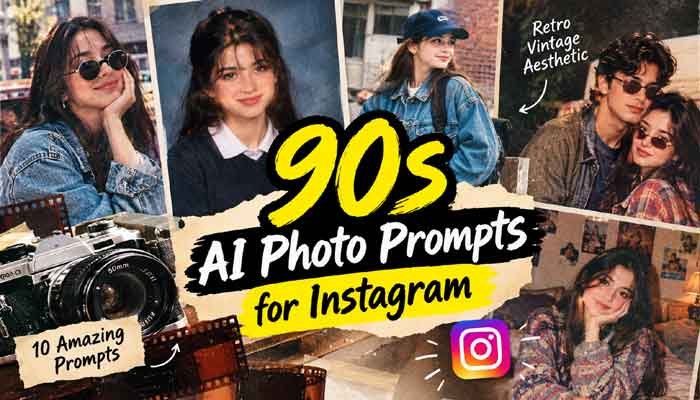
There is something special about old photographs. The slightly faded colors, imperfect lighting, classic outfits, and natural expressions can make an ordinary picture feel like a memory from another time. Today, you can recreate that feeling with AI image tools without needing an old film camera or a professional photography studio.
The growing interest in 90s AI photo prompts for Instagram comes from the appeal of nostalgic pictures that look personal rather than overly edited. A regular selfie can become a vintage yearbook portrait, a casual street photograph, or a soft film-style picture inspired by the 1990s.
The best part is that you do not need advanced editing skills. With a clear reference photo and a well-written prompt, you can experiment with different hairstyles, outfits, backgrounds, and lighting styles while keeping your recognizable appearance.
In this guide, you will find ten ready-to-copy prompts, simple instructions for using them, and practical tips to help your images look more natural.
Read Also This : Best Free AI Tools for Instagram Reels 2026: 7 Tools Worth Trying
Why Are 90s Retro Photos Popular on Instagram?
The 1990s had a distinctive photographic style. Disposable cameras, school portraits, family albums, denim outfits, casual streetwear, and direct camera flash were common parts of everyday photography.
Unlike many modern portraits, old photographs were not always perfectly sharp or carefully polished. Small imperfections made them feel authentic. That is exactly the look many creators want when experimenting with AI-generated retro images.
The appeal of 90s AI photo prompts for Instagram is that they let you recreate different parts of that era without completely changing the person in the original photograph.
You can create a simple bedroom portrait, a classic school picture, or a candid-looking snapshot from a fictional 1996 afternoon. These styles can work well for Instagram posts, profile pictures, carousel posts, and nostalgic photo collections.
How to Create a Realistic 90s AI Photo
Before trying the prompts, choose a clear photograph with your face visible. A simple portrait with natural lighting usually gives an image model a better reference than a heavily filtered selfie.
Follow these steps:
- Open an AI image-generation or photo-editing tool that supports reference images.
- Upload a photograph you own or have permission to edit.
- Copy one of the prompts below and paste it into the tool.
- Generate the image and check whether your face and proportions remain recognizable.
- If something looks unnatural, ask the tool to correct that specific detail instead of starting again.
When working with 90s AI photo prompts for Instagram, describe the entire photographic style rather than simply asking for a vintage filter. Mention the clothing, setting, lighting, camera characteristics, and film texture you want.
10 Best 90s AI Photo Prompts for Instagram
The following prompts are written in English because detailed English descriptions can be convenient when working with many image-generation tools. You can copy them directly and adjust the details to suit your personal style.
1. Classic 1990s Film Portrait
This is a good starting point if you want a simple portrait that resembles a photograph found in an old family album.
Copy-and-paste prompt:
Use the uploaded photo as the reference. Preserve the person’s recognizable facial features, face shape, skin tone, and natural expression. Recreate the portrait as an authentic 1995 photograph taken with a consumer 35mm film camera. Add casual 1990s clothing, soft natural lighting, slightly faded colors, subtle film grain, gentle softness, and realistic skin texture. Keep the background simple and believable. Avoid modern filters, excessive retouching, plastic-looking skin, and exaggerated vintage effects. The final image should look like a real photograph from the 1990s.
2. 90s School Yearbook Portrait
School photographs are instantly recognizable because of their simple backgrounds, straightforward poses, and slightly formal appearance.
Copy-and-paste prompt:
Transform the uploaded reference photo into a realistic 1995 school yearbook portrait. Preserve the person’s identity and natural facial proportions. Use a muted blue-gray studio backdrop, a simple period-appropriate shirt or sweater, neat 1990s hair, and direct but soft studio flash. Frame the subject from the chest upward with a relaxed, natural expression. Add subtle analog film grain, slightly cool colors, and the gentle softness of an older printed photograph. Avoid modern fashion, excessive makeup, and artificial skin smoothing.
3. Disposable Camera Flash Photo
If you prefer casual pictures over studio portraits, this style recreates the spontaneous look of photographs taken at parties or family gatherings.
Copy-and-paste prompt:
Recreate the uploaded photo as a candid snapshot taken in 1997 using a disposable 35mm film camera. Preserve the person’s recognizable face, natural skin tone, and body proportions. Use direct on-camera flash, slightly imperfect exposure, soft background shadows, natural color shifts, and fine film grain. Add casual 1990s clothing and an ordinary indoor setting with realistic details. Make the photograph feel spontaneous, unposed, and imperfect in a believable way. Avoid cinematic lighting, modern smartphone effects, and excessive sharpness.
4. Vintage 90s Streetwear Look
The 1990s streetwear aesthetic works well for fashion-focused posts, especially if you enjoy relaxed clothing and casual urban photography.
Copy-and-paste prompt:
Use the uploaded image as the identity reference and restyle the subject in authentic 1994 streetwear. Keep the face recognizable and preserve natural skin texture. Add an oversized denim jacket, loose-fit jeans, classic sneakers, and a simple cap if appropriate. Place the subject on an ordinary city street with brick walls and understated urban details. Use natural daylight, slightly muted colors, subtle analog grain, and a candid 35mm photography style. Keep the outfit believable for the period and avoid modern logos or futuristic elements.
5. Soft 90s Bedroom Aesthetic
A relaxed bedroom portrait can give your feed a personal, nostalgic atmosphere without looking like a professional fashion shoot.
Copy-and-paste prompt:
Recreate the uploaded photo as a casual bedroom photograph from 1996. Preserve the person’s recognizable identity, facial features, and natural complexion. Use a simple bedroom with patterned bedding, a wooden dresser, a small lamp, and understated period details. Style the subject in comfortable 1990s casual clothing. Use soft window light, slightly faded film colors, gentle shadows, and subtle grain from a consumer film camera. The pose should feel relaxed and unplanned, like a photograph taken by a friend. Avoid modern electronics and overly polished studio effects.
6. Retro Denim Fashion Portrait
Denim was a defining part of everyday fashion during the decade. This prompt creates a classic look without requiring an elaborate background.
Copy-and-paste prompt:
Transform the reference photo into a realistic 1990s fashion portrait. Preserve the person’s recognizable face, skin tone, and proportions. Style the subject in a classic denim jacket, a plain fitted T-shirt, straight-leg jeans, and understated accessories appropriate to the period. Use a simple outdoor wall as the background, with soft daylight and a slightly cool film color palette. Add natural skin texture, subtle 35mm grain, and gently faded colors. Keep the pose confident but casual, like a photograph from a 1996 fashion magazine.
7. 90s Couple Photograph
Couple portraits can look especially nostalgic when the pose is simple and the photography resembles an ordinary personal snapshot.
Copy-and-paste prompt:
Recreate the uploaded couple photo as a genuine-looking 1990s film photograph. Preserve both people’s individual facial identities, skin tones, and natural proportions. Keep their relationship, relative positions, and general pose consistent with the reference. Add simple period-appropriate casual outfits, soft natural lighting, slightly faded colors, and subtle analog film grain. Use an ordinary outdoor or home setting with an intimate, relaxed atmosphere. Do not blend faces, change identities, or make the people look like different individuals. Avoid exaggerated romantic effects and artificial skin smoothing.
8. Vintage Cafe Snapshot
A small cafe, an old chair, and soft window light can create a convincing retro scene without adding too many distracting elements.
Copy-and-paste prompt:
Use the uploaded photo as the reference and create a candid cafe snapshot from 1998. Preserve the person’s recognizable face and natural appearance. Place the subject beside a cafe window, wearing understated 1990s casual clothing. Add a simple coffee cup, wooden furniture, and a softly blurred background. Recreate the look of consumer 35mm film with gentle grain, slightly faded colors, natural window light, and imperfect framing. The image should feel like a personal photograph taken during an ordinary afternoon, not a modern commercial photoshoot.
9. 90s Nighttime Flash Photography
For a more dramatic result, try the imperfect flash photography associated with casual evening snapshots.
Copy-and-paste prompt:
Turn the uploaded photo into a realistic nighttime snapshot taken in 1996. Preserve the person’s facial identity, natural complexion, and proportions. Use direct camera flash to illuminate the subject while keeping the background darker and slightly underexposed. Add period-appropriate casual clothing, natural shadows, subtle film grain, and mild color imperfections. The setting should feel like a real evening gathering or quiet street scene. Avoid neon cyberpunk effects, excessive contrast, artificial skin, and modern cinematic color grading.
10. Old Family Album Photograph
If you want the result to feel less like a fashion trend and more like a genuine memory, this is a useful style to try.
Copy-and-paste prompt:
Recreate the uploaded photograph as a personal family-album picture taken in 1993. Preserve the recognizable identities, facial features, and natural expressions of everyone in the image. Use simple everyday clothing, a modest home or garden setting, natural poses, and the slightly imperfect composition of an amateur photographer. Add subtle film grain, mildly faded colors, soft edges, and realistic lighting. Keep all people distinct and anatomically natural. The final photograph should feel authentic, ordinary, and emotionally nostalgic rather than staged or digitally enhanced.
Tips for Better AI Retro Photos
A detailed prompt helps, but the reference image and small adjustments can make just as much difference.
Keep the Face Natural
If the result looks like a different person, add a clear instruction to preserve facial proportions, eye shape, skin tone, and recognizable features. Avoid combining several different reference faces unless you specifically want a composite.
Do Not Overdo the Film Grain
A little grain and softness can create a convincing film look. Too much noise, scratches, or fading can make the image look damaged rather than nostalgic.
Choose Era-Appropriate Details
Clothing and backgrounds help establish the decade. Denim, plain T-shirts, casual sweaters, older furniture, and simple studio backdrops are often more convincing than adding random vintage objects.
Experiment With Lighting
Direct flash can make a photograph feel like a party snapshot, while soft window light works well for portraits. Describe the lighting you want instead of relying on the word “vintage” alone.
Make One Change at a Time
If the first result is close but the colors look too modern, request more natural film colors. If the face looks overly smooth, ask for realistic skin texture. Making focused corrections helps you understand which instructions improve the result.
These small adjustments can make 90s AI photo prompts for Instagram more useful across different image styles and reference photographs.
Why These Retro Prompts Work So Well
The best 90s AI photo prompts for Instagram describe more than vintage colors. They explain the camera style, clothing, lighting, and background to help create a believable retro photograph.
If you want a classic portrait, choose 90s AI photo prompts for Instagram that focus on natural expressions, soft film grain, and simple backgrounds.
For fashion content, 90s AI photo prompts for Instagram can help recreate denim outfits, oversized jackets, and casual street photography inspired by the decade.
Experimenting with different 90s AI photo prompts for Instagram is a simple way to build a consistent vintage aesthetic for your social media feed.
How to Make Your Retro Photos Stand Out on Instagram
Once you have generated a photograph you like, think about how it fits into your overall feed.
- Try a carousel: Share the original photograph alongside two or three different retro versions.
- Keep a consistent aesthetic: Use similar color tones and editing styles across a series of posts.
- Write a natural caption: A simple line about old memories or a different decade can work better than an overly promotional caption.
- Choose a suitable crop: Use a square image for a traditional profile-style post or a portrait crop for a vertical feed post. Check Instagram’s current upload options before publishing.
- Be honest about AI editing: If the image could be mistaken for a real historical photograph, consider making its AI-generated nature clear.
You can also experiment with a 1993 family portrait, a 1996 streetwear picture, and a 1998 disposable-camera snapshot using the same reference photo. This gives you a consistent series without making every image look identical.
Common Problems and How to Fix Them
The image looks too modern. Add details about the period’s clothing, everyday surroundings, consumer film, and simpler photography. Ask the tool to remove modern objects.
The face changes too much. Use a clearer reference photo and repeat the instruction to preserve the person’s identity. Avoid asking for major facial alterations alongside the retro transformation.
The result looks too orange. Replace heavy sepia effects with neutral or slightly faded colors. Many 1990s photographs were not strongly orange or brown.
The image looks artificial. Remove excessive effects, reduce the grain, and request natural skin texture, believable lighting, and imperfect composition.
The prompt changes too many details. Specify which elements should stay the same, such as the face and pose, and which elements may change, such as clothing, background, and camera style.
Frequently Asked Questions
Can I use these prompts with ChatGPT or Gemini?
Yes. You can adapt these prompts for AI image tools that support image generation or reference-photo editing. Results will vary depending on the model and its image-editing capabilities.
Do I need an old photograph to create a 90s look?
No. A recent, clear photograph can serve as the reference. The prompt describes how the tool should recreate the styling, environment, and photographic appearance.
How can I make an AI photo look more realistic?
Use a clear reference, describe a specific photographic setting, and avoid excessive filters. Natural skin texture, believable lighting, restrained grain, and period-appropriate details usually help.
Can I use the generated pictures on my Instagram account?
You can generally share images you have the right to use, subject to the image tool’s terms and Instagram’s applicable rules. Avoid using someone else’s likeness without permission or presenting a fictional historical image as authentic evidence.
Final Thoughts
Retro photography does not need complicated effects to look good. Often, the most convincing images are the simplest ones: a relaxed pose, familiar clothing, ordinary surroundings, and the imperfect texture of an old film camera.
Start with one of these prompts, compare a few results, and make small changes until the photograph feels right. With a little experimentation, 90s AI photo prompts for Instagram can help you create a consistent retro aesthetic for personal portraits, fashion posts, couple photos, and nostalgic social media collections.
The key is to aim for a believable photograph rather than a perfect-looking digital image. That small difference is what gives a retro portrait its character.